📜Table on Content
Introduction
Advantages of Gmail Account
There are some advantages of Gmail that as under:
- Fast compose and fast reply
- It’s 100% free service.
- 15 GB free storage space
- It has spam folder for clean your inbox
- Save to Google Drive
- 15 MB file size for attachment
- Fast searching by date
- Easily Access
- Google search functionality
- Worldwide Online meeting
- Easily connect with other Google Products
How to Create a New Gmail Account
Step 1: Open the Gmail page with type www.gmail.com
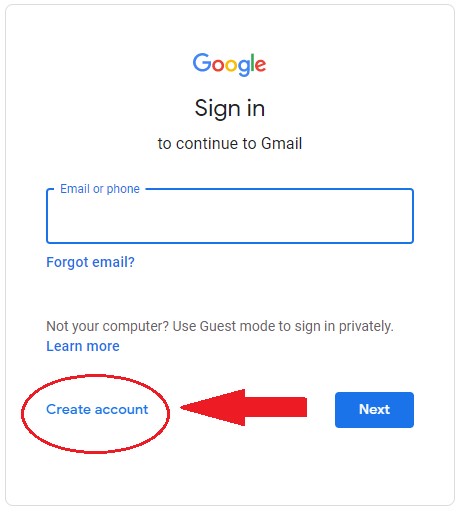
Step 2: Click
“Create account”
Step 3: When
you click on Create account, then show its account option select this one

Step 4:
After that, Gmail account form will be appear, you fill this form with First
Name, Last Name, Username and choose the Password then click Next Button.

Step 5: After
that, verify your phone number and fill the next Date of Birth, Gender, then
click Next Button.


Step 6: Next
After that, you’re read Google Privacy and Terms then Click I Agree.
Your New
Gmail account has been ready. Show Gmail first windows.

How to
Sign out your Gmail Account?
Step 1:
Click on Profile icon in Gmail Inbox window at the right side on the top.

Step 2:
Click Sign out of all accounts button, now you’re currently Gmail account is
signed out.
 0
0 0
0 20
20
 20
20
![35 Best Niches for Creating a New Website [Updated 2023]](https://blogger.googleusercontent.com/img/b/R29vZ2xl/AVvXsEgBou7MXLV7zOcTOC05K5pco4_vUlH6_PVOlZpwO6gcGuVwXhBH8u3nzeJJMUvsyIQu2hrUoMRx0reSd6QhgkfzBbfI-xmLzHEC03oIMwAr5JTFxGjrICZMkox_k_mgjw3GJ2BWKEO9InjrV4I5BBOwcS9dFmeIXWL4DMMnPlKcJXn9Xyqs9bYSm0846g/w640-h384/35%20Best%20Niches%20for%20Creating%20a%20new%20Website%20.jpg "35 Best Niches for Creating a New Website [Updated 2023]")
.jpg "5 Proven Ways to Make Money Online in 2023")